Bidirektionale CRM-Synchronisation: Salesforce ↔ Administrate
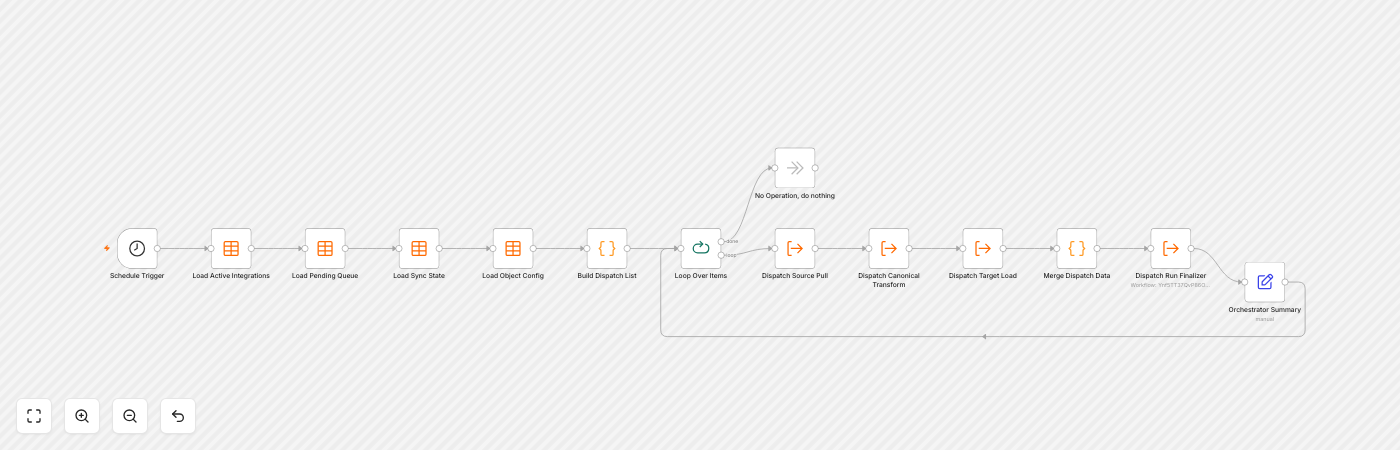
Eine ereignisgesteuerte Pipeline alle 15 Minuten, die Konten, Kontakte und Opportunities zwischen Salesforce und Administrate perfekt abstimmt — mit 100% Workflow-Gesundheit.
Die Herausforderung
Administrate (Plattform für Schulungs- und Eventmanagement) und Salesforce hielten beide CRM-Daten, die synchron bleiben mussten. Datensätze wurden manuell verwaltet, über Systeme hinweg dupliziert, und es gab keine zuverlässige Möglichkeit, Konten, Kontakte und Opportunities in beide Richtungen abzustimmen.
Die Lösung
Wir haben eine bidirektionale Integration entworfen und geliefert, die auf einer selbst gehosteten n8n-Instanz läuft, mit einem Orchestrator, der alle 15 Minuten eine Sync-Warteschlange verarbeitet.
- Salesforce → Administrate: Konten, Kontakte, Opportunities und Positionen fließen als Batch-Upserts, abgeglichen über externe ID.
- Administrate → Salesforce: Konto- und Kontaktprofile fließen als zusammengesetzte Batches zurück.
- 11 Workflows (Orchestrator, Source-/Target-Pipelines, kanonische Transformation, Finalizer, Fehler-Notifier) + 10 Datentabellen.
- Schleifenvermeidung (PATCH per Salesforce-ID) und Konfliktlösung (last-write-wins) integriert.
- Dual-Kanal-Alarmierung bei Fehlern über Slack und Telegram.
Ergebnisse
- 100% Workflow-Gesundheit über alle aktiven Entitäten.
- Verarbeitet Paginierung von 2.000+ Datensatz-Antworten und Batches von 200 Datensätzen pro Lauf.
- Ausgelegt auf einen Worst Case von ~350k Updates/Tag, mit ~70% am Ursprung gefiltert.
Geschäftsprobleme
- Daten lagen in zwei Systemen (Salesforce + Administrate) ohne zuverlässige Synchronisierung
- Manuelle Dateneingabe verursachte Duplikate und Abweichungen zwischen CRM-Datensätzen
- Hohes prognostiziertes Volumen (~350k Updates/Tag) erforderte ein skalierbares, inkrementelles Design
Wesentliche Vorteile
- Bidirektionale, inkrementelle Synchronisierung hält beide Systeme automatisch abgeglichen
- Batch-Upserts über externe ID abgeglichen — keine Duplikate
- Schleifenvermeidung und Konfliktlösung in der Pipeline integriert
- Fehler erscheinen sofort in Slack und Telegram über einen dedizierten Fehler-Notifier
Anwendungsdetails
- Selbst gehostetes n8n mit 11 gemeinsamen + tenant-spezifischen Workflows
- 10 n8n-Datentabellen konfigurieren Entitäten, Mappings, Warteschlange, Status und Alarme
- Orchestrator läuft alle 15 Minuten mit 200er-Batches
- Event- und Registrierungs-Sync vorgebaut und bereit zur Aktivierung